Get requests and reminders by text
Turn texts on for your phone, choose which ones come, answer a request by replying, and stop them any time.
PraisePad can text you your requests to play, reminders, announcements and sub requests, and you can answer a request by replying. Texts stay off until you turn them on yourself: open the account menu (the circle with your initial), choose , then . Email keeps coming as well.
Open in PraisePad to try itTurn texts on
- Type your number under . It needs to be a US or Canadian mobile number.
- Choose . A six-digit code comes by text and works for 10 minutes.
- Type it under .
- Read the agreement and check .
- Choose .
One text confirms you're set. No code? Choose . Texts are for you, in every church you're in. To change phones later, choose .
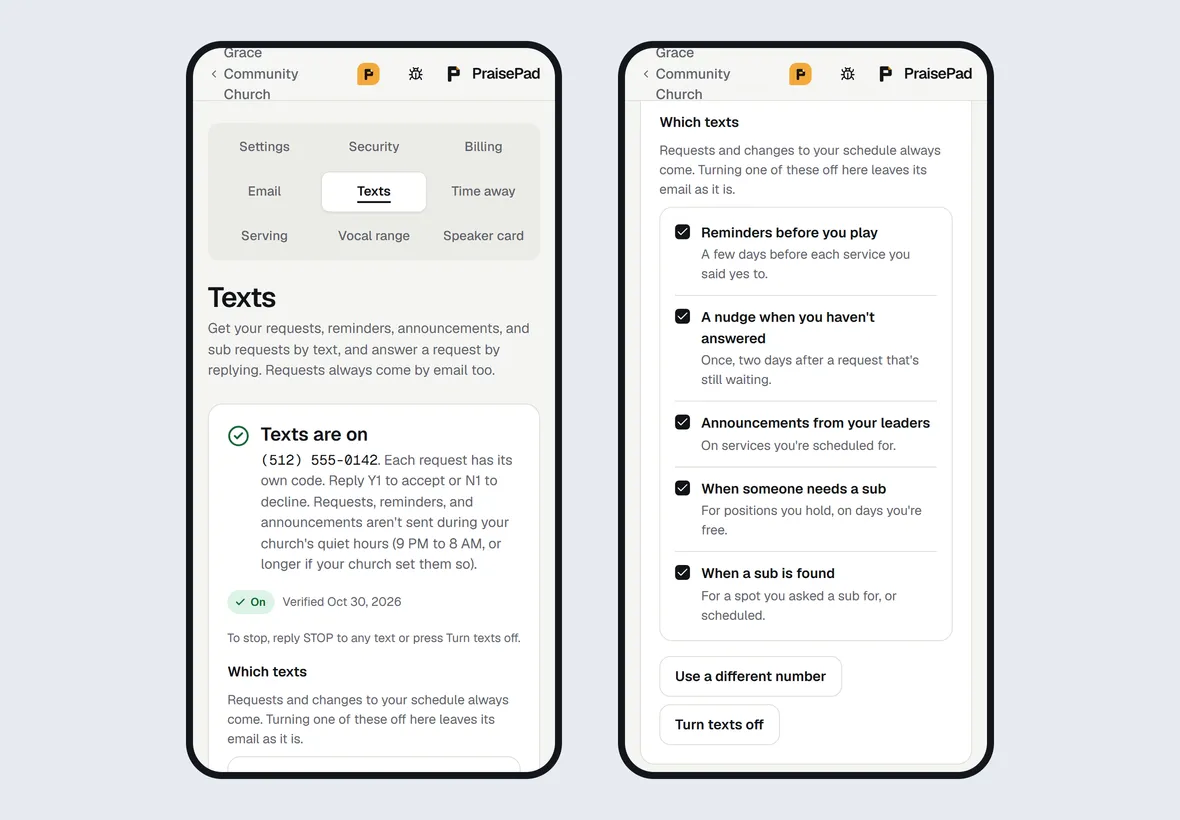
Which texts come
Requests to play, changes to your schedule (taken off a service, or a service moved or canceled), and a leader asking for your time away always come. Under , uncheck any of these you'd rather not get by text. The change saves right away, and your emails stay as they are.
- : for positions you hold, on days you're free
If you chose Requests and changes only or A weekly summary on your page, reminders, nudges and announcements don't come by text either. Sub requests still do, unless you've unchecked them.
Answer a request by text
A request text ends with its own code, like "Reply Y2 to accept or N2 to decline". Reply Y2 for yes or N2 for no, and PraisePad texts back to confirm. When only one request is waiting, a plain yes or no works too. Changed your mind? Reply with the other letter and the same number, until the service starts. See Say yes or no to a request.
Nobody reads the texts you send to PraisePad's number. To tell your leader something, answer from the link in the text instead.
Quiet hours
Nothing is texted between 9 PM and 8 AM, your church's time: a text that comes up then waits until morning. Your church may make the quiet hours longer, never shorter.
Stop texts
- Reply STOP to any text. Nothing more is sent to that number, and one text confirms it. Reply START to get texts again.
- Or choose on the page.
- Reply HELP for how to reach us.
Requests still come by email either way.
Your church's plan
Texts come with a church's paid plan, at no extra charge. A new church's 14-day trial includes up to 25 texts; after that, messages go by email until it subscribes. The page names any church of yours whose plan doesn't include texts.