Go back to a conversation with Pad
Checked Oct 28, 20261 minute to read
Pad keeps your conversations for 90 days. Open one again, carry it on, or delete it.
Pad keeps your conversations in the app, so you can go back to one.
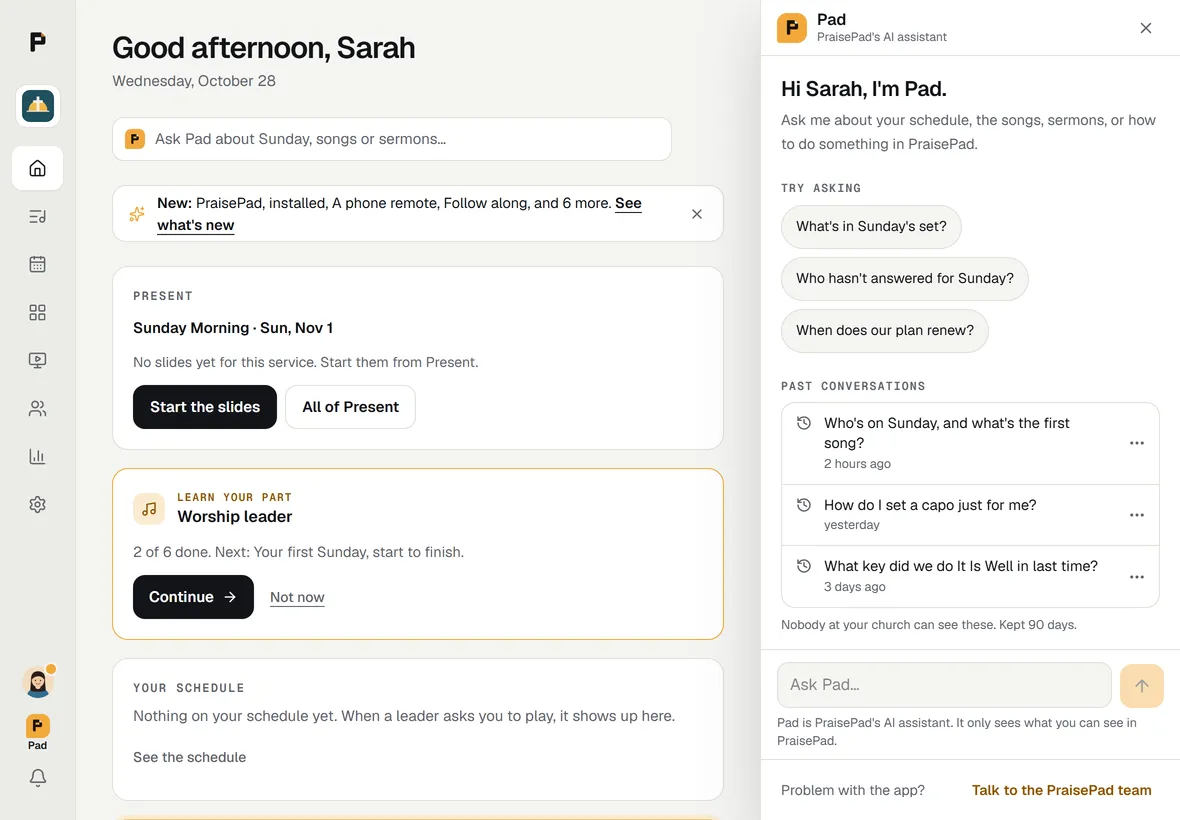
Open one again
- Open Pad with the button.
- Under "Try asking", Past conversations lists your latest five in this church, with when you last asked. shows the rest, by month.
- Tap one. It opens with your questions and Pad's answers, and you can ask a follow-up.
Open Pad within half an hour of your last question, after a reload or on your phone after your laptop, and it carries on by itself. A line above it says when it's from, with beside it.
Pad answers a follow-up from its last few exchanges, as in a conversation you just started.
Delete one
Choose at the end of a conversation, or the ... button beside it in the list, then . It's gone on every device.
What's kept
- Each conversation is kept for 90 days after you last asked in it. Nobody at your church can read them.
- They go if you leave the church, or delete your account.
- A message that's only personal isn't kept. The conversation says "A personal message here wasn't kept." where it was.
- When the PraisePad team opens your church on a support visit, Pad keeps nothing.
See Your privacy.
Open in PraisePad to try itDid this help?One tap. It tells us what to make clearer.