Your church's own web address
Put your church site on your own address, like www.gracechurch.org, with a few records at your domain's company.
Your church site can open at your church's own web address, like www.gracechurch.org. You add a few records at the company where your domain is managed, and PraisePad does the rest: the padlock, the move, and a check every day. Your old address keeps working and sends people to the new one, for good, so posters and QR codes out there keep landing. It's included with PraisePad Church.
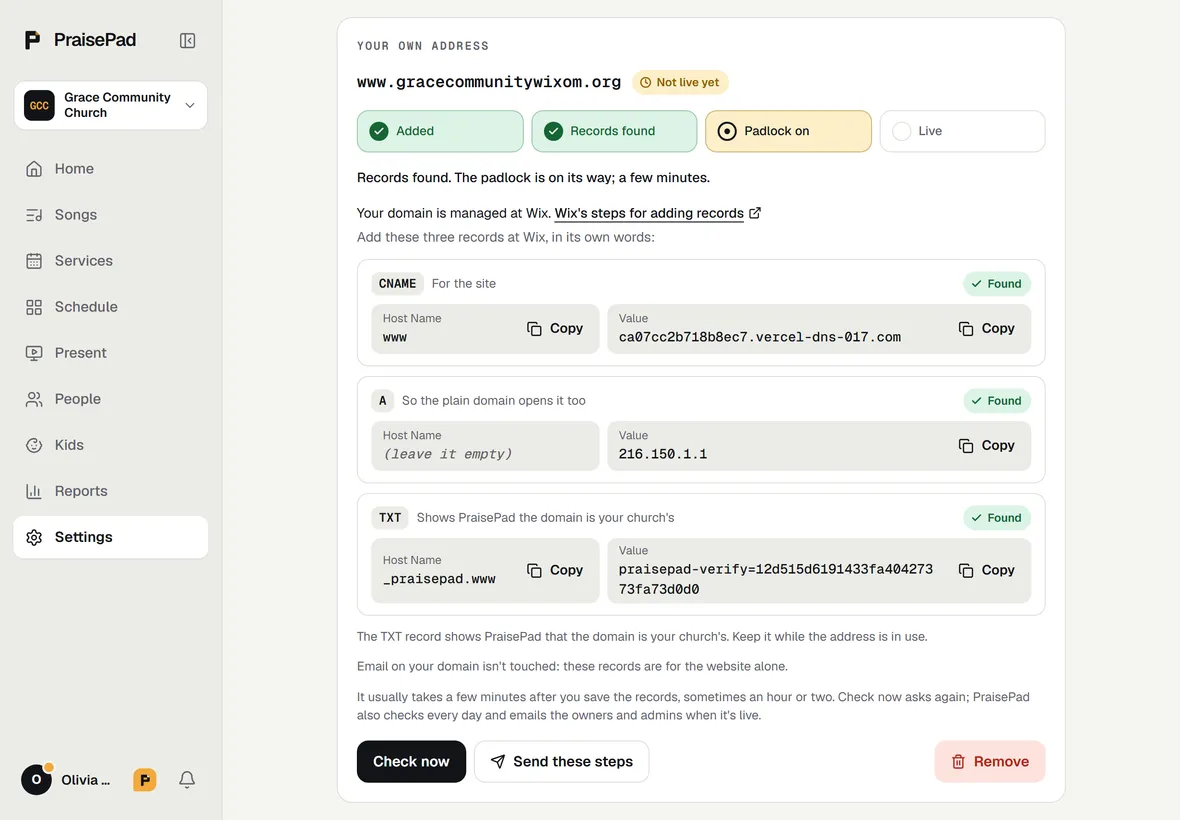
Not the one who manages your domain? Press and type their email: they get the records and their company's steps, in English or Spanish, and their replies come back to you.
At your domain's company
The card names the company from your domain's settings (GoDaddy, Namecheap, Cloudflare, Squarespace, where Google Domains' names went, or Wix) and links straight to its page for records. The records' names and values are shown in that company's own words, so you can match them box for box; at Wix, the name box for the plain domain stays empty. At Cloudflare, set Proxy status to DNS only (the grey cloud), not Proxied, or the padlock can't come on.
Keep the TXT that shows the domain is your church's while the address is in use: PraisePad looks for it before the address goes live.
Sometimes the card shows one more TXT, because another account at our hosting has used the domain: it proves the domain is yours. Add it too; it can go once the address is live.
Good to know
- It usually takes a few minutes after you save the records, sometimes an hour or two. PraisePad checks every day and emails the owners and admins when it's live, and if it ever stops working; the site goes back to its old address by itself until it's fixed.
- Email on your domain isn't touched: these records are for the website alone.
- Signing in and people's own pages (My giving, a family pass, a sign-up's change-or-cancel page) stay on church.praisepad.app, where their sign-in lives; your address sends them there.
- puts your site back at its old address at once. Then delete the records you added at your domain's company, so your address doesn't point at our hosting any more.
- Search results show your church's own name and icon once the site is at your own address (see Your church site, found in search).