Bring in a PowerPoint
For leadersChecked Oct 26, 20262 minutes to read
Drop a PowerPoint on a part of the slides: its words, notes and pictures come in as slides you can edit.
A sermon deck made in PowerPoint comes into Present as real slides. The file is read on your own computer; only its pictures are uploaded.
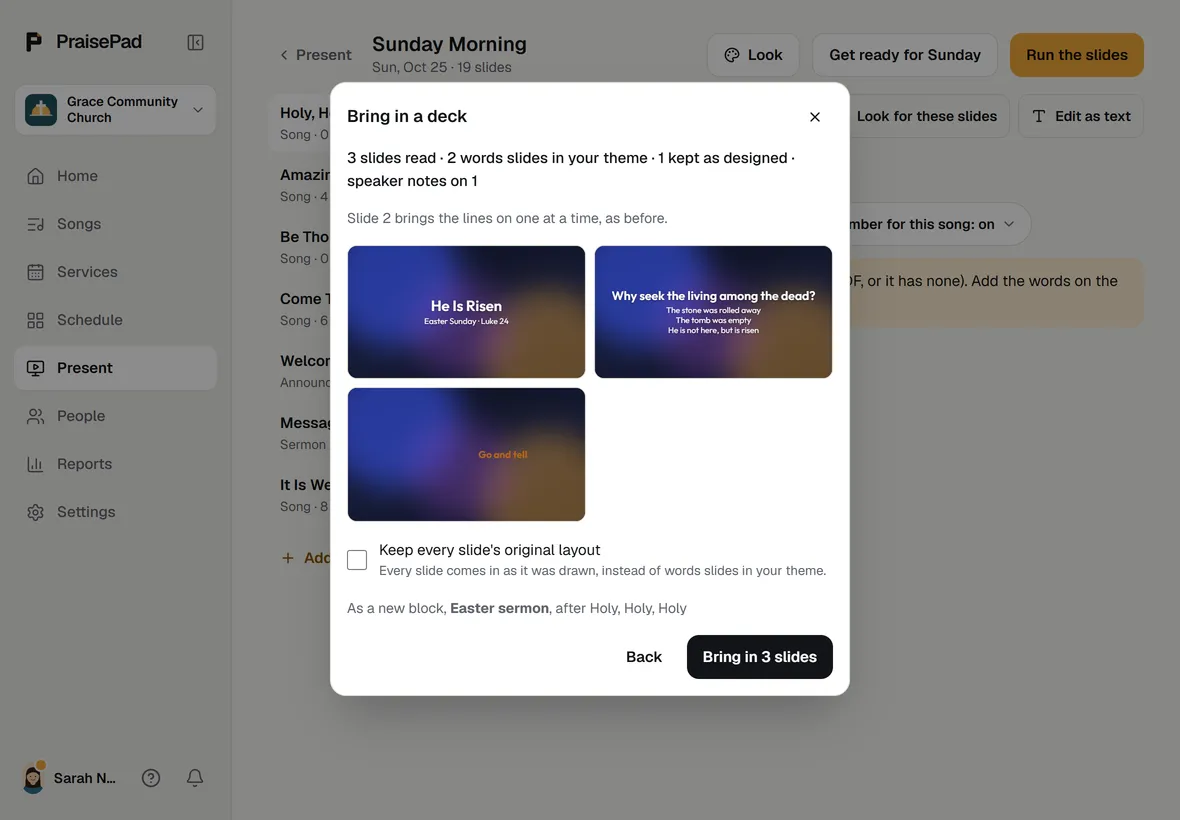
Bring one in
- Open the presentation and find the part the slides belong to. Press there, or press and choose the deck item for a new part named after the file.
- Drop the .pptx in, or press . For Google Slides, paste the deck's link (shared as "Anyone with the link") and press . In Keynote, choose File, Export To, PowerPoint first.
- Read the line that says what the deck becomes: how many slides, how many are words slides in your theme, how many are kept as designed, how many have speaker notes. The first slides are drawn under it, and a line says where they go.
- Tick if the deck's look matters more than your theme. Press the button that says how many slides it will bring in.
When it's done the first new slide is selected, and a line at the top says what came in, with .
What each slide becomes
- A slide with a title, or a title and its points, becomes a words slide in your theme, split into parts the back row can read.
- A slide with a picture or a layout of its own becomes a design slide: each box where it was, in its size and colour, each picture in place. A font PraisePad doesn't have falls back to your theme's.
- Speaker notes go on the slide, for the pastor's screen and the booth.
- A hidden slide stays hidden. Lines that came on one click at a time still do; other animations don't come across, and the summary says which slides had them.
- Charts, SmartArt and some drawings can't be drawn here; the summary names the slides that lost one. A logo or banner that lives in the deck's template doesn't come across either.
The deck's pictures go into the Library under Decks, in a folder named after the deck. A PDF still comes in the old way, each page a picture.
Did this help?One tap. It tells us what to make clearer.